How it works

Two ways to connect, both measured in minutes

Most platforms make you re-plumb your stack before you save a single dollar. Revenium starts where your spend already is: your developers' AI coding assistants — connected org-wide by one admin, with no code changes. Custom apps and agents follow with one lightweight SDK.

Path 1 · Recommended first step

Connect your coding assistants

Under 10 minutes, org-wide · no per-developer setup · no code changes

For Claude Code on a Team or Enterprise plan, an administrator pastes one Revenium-generated config block into Claude Console → Managed settings — once. Every authenticated developer starts reporting on next startup. Cursor, Copilot, and Claude Cowork connect org-wide the same way via admin UI or Admin-API sync. Individual developers can also self-install via CLI.

  1. Sign up free — Revenium generates your org's config block
  2. Paste it into your assistant's managed settings (admin, once)
  3. Watch "developers reporting" tick up live, in the same session
  4. Open AI by Employee: cost per developer, per PR, per session
Path 2 · Custom apps & agents

Add the SDK

⏱ ~2 minutes per service · Python, Node, Go

One unified package instruments every provider you use. Two environment variables and you're metering. Add optional metadata to unlock customer-level spend, product-tier costs, and per-agent attribution — plus tool calls and human-time events no gateway can see.

  1. pip install revenium-middleware
  2. Set two environment variables — one for Revenium, one for AI
  3. Optional: tag customer, product, agent, and job metadata

Also available: MCP server for agent-driven cost analytics, n8n drop-in agent, LiteLLM callback, and a published OpenTelemetry GenAI profile.

The coding-assistant path, recorded in the product

From one pasted config block to a fully itemized engineering org — recorded from the actual first-run experience.
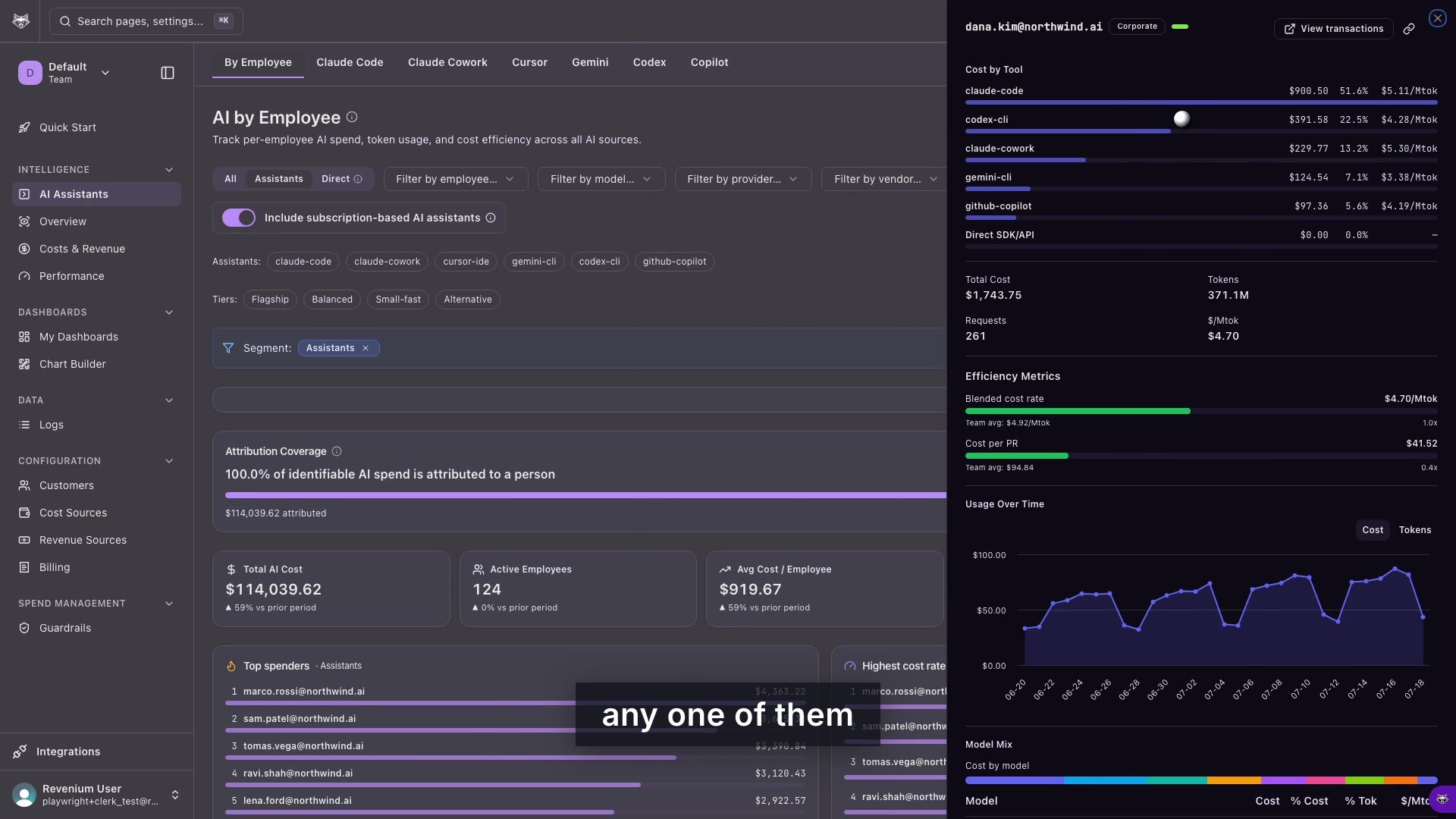
app.revenium.ai — AI by Employee, live walkthrough ▶ 1:35
Per-developer AI spend walkthrough

Filter by employee, model, provider, or vendor. Toggle subscription-based assistants in or out. Drill into any developer for cost by tool, efficiency vs. team average, and cost per PR.

From first numbers to first savings

MINUTE 10

Who's spending what

Every developer's AI cost across every assistant, attributed to a person — with team totals, top spenders, and daily trend from day one.

DAY 1

Whether it's efficient

Blended $/Mtok per developer vs. team average. Flagship-vs-efficient model mix. Cache hit-rates. The first seat and tier optimizations usually appear the same day.

WEEK 1

What it produces

Join the telemetry to GitHub or GitLab and get cost per PR merged: a defensible AI-productivity number most teams have never had before.

AS YOU GROW

Everything else AI touches

Add the SDK to custom apps and agents: customer-level COGS, tool costs, guardrails, chargeback invoices, FOCUS exports, and outcome-level ROI.

Technical question? Ask the docs

Get answers straight from our documentation — connection steps, data handling, API details — without losing this page. If an answer doesn't settle it, a human is one click away.

Ten minutes from now, this could be your org's data

Free for 100K transactions a month. No credit card. No code changes.